



Introduction
Building your own gaming PC may seem intimidating, but it’s one of the most rewarding tech projects you can do. You get to choose every part, match your performance goals, and save money. Let’s walk through the process together with AVANZA’s easy guide.
Step 1: Choose Your Components
- Processor (CPU): The brain of your PC. Choose Intel Core i7/i9 or AMD Ryzen 7/9.
- Graphics Card (GPU): Crucial for gaming. Go for NVIDIA RTX 40 series or AMD Radeon RX.
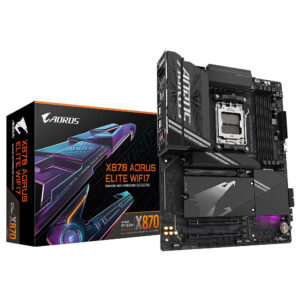
- Motherboard: Make sure it supports your CPU and has enough PCIe slots.
- RAM: 16GB is the standard; 32GB for heavy gaming and streaming.
- Storage: Combine an SSD for speed and HDD for storage.
- Power Supply (PSU): Ensure enough wattage (use 650W–850W for gaming builds).
- Case: Pick a case that fits your motherboard (ATX, Micro-ATX) and provides good airflow.
Step 2: Assemble the PC
- Install the CPU and RAM on the motherboard.
- Mount the motherboard inside the case.
- Add your power supply and connect cables.
- Install your GPU and storage drives.
- Power it on and install Windows or Linux.
Step 3: Optimize Performance
- Update all drivers
- Enable XMP in BIOS for RAM
- Adjust fan curves for better cooling
Conclusion
Building your own gaming PC gives you control, customization, and performance.
Find all the components you need at AVANZA — from processors and GPUs to RAM and cooling systems.


Leave a comment